Circuit fires scare everyone and damage brand reputation. Overcurrent destroys expensive home appliances instantly. I will show you how to use the ACS711KLCTR-25AB-T1 to stop this effectively.
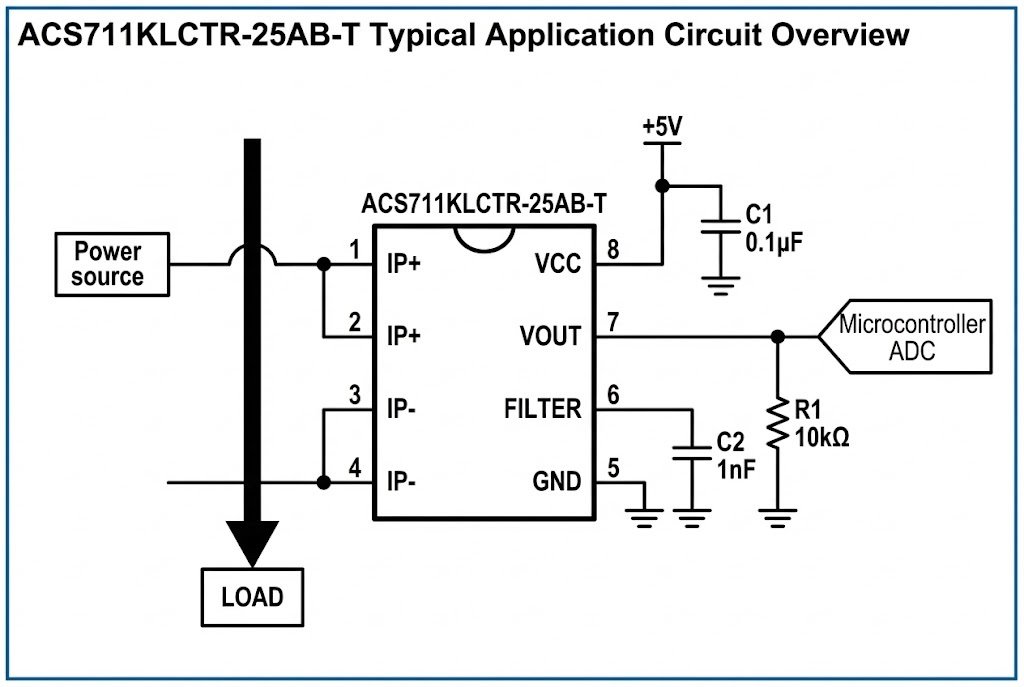
The ACS711KLCTR-25AB-T1 is a linear current sensor IC2. To design protection, you connect its analog output to a comparator or MCU3. When the current exceeds 25A, the system detects the voltage change and cuts power immediately, which is vital for safety in consumer electronics.
Many engineers struggle with signal noise4 and correct layout techniques. I will explain the steps clearly so you can avoid common mistakes and keep your electronics safe.
LOOP START
Why Is the ACS711KLCTR-25AB-T1 Good for Home Appliances?
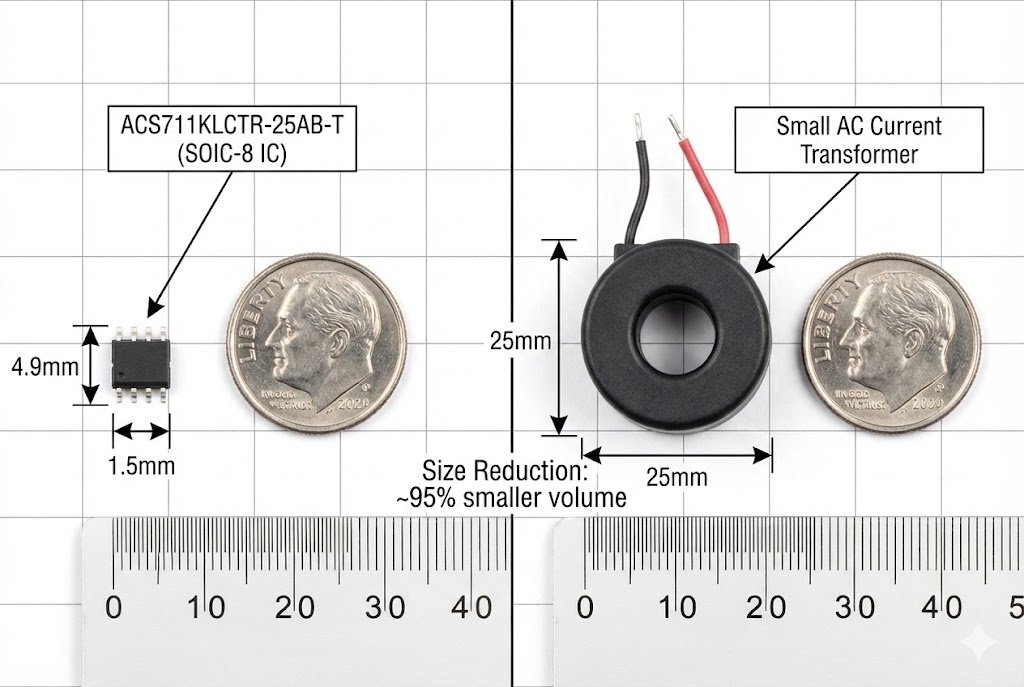
You need a cheap but safe sensor for mass production. Bulky transformers take up too much space in modern devices.
The ACS711KLCTR-25AB-T1 offers 25A sensing in a small SOIC-8 package5. It has an internal conductor resistance6 of only 0.6 mΩ, reducing heat, which is perfect for compact vacuum cleaners and air conditioners.
I see many customers at Nexcir7 choosing components for home appliances. They always worry about space and heat. The ACS711KLCTR-25AB-T1 solves both problems. It is a Hall-effect sensor8. This means it measures current without direct electrical contact with the sensing element. However, the ACS711 has a built-in copper conduction path9. The current flows through this path. The sensor detects the magnetic field generated by the current.
Here is a breakdown of why this specific part fits consumer electronics:
Key Specifications for Appliances
| Feature | Specification | Why it matters for you |
|---|---|---|
| Package Type | SOIC-8 | It fits on small PCBs in blenders or robot vacuums. |
| Current Limit | ±25 A | It covers the surge current of most DC motors. |
| Resistance | 0.6 mΩ | It produces very little heat loss. |
| Bandwidth | 100 kHz | It reacts fast enough to stop motor burnout. |
I often tell my clients that heat is the enemy. In a plastic housing, you cannot have a hot resistor. Traditional shunt resistors get very hot at 25A. This chip does not. The 0.6 mΩ resistance is negligible. If you run 10A through it, the power loss is very small.
$$P = I^2 times R$$ $$P = 10 times 10 times 0.0006 = 0.06 Watts$$
This is nothing. Your plastic enclosure stays cool. This makes it the top choice for our customers making smart home devices.
LOOP END
LOOP START
How Do You Connect the ACS711 to a Microcontroller?
A raw sensor signal is not enough for protection. You need to read the data correctly to trigger a switch.
Connect the VIOUT pin to your MCU's Analog-to-Digital Converter (ADC). For faster reaction times, use an external comparator to trigger an interrupt when the voltage hits a specific threshold.
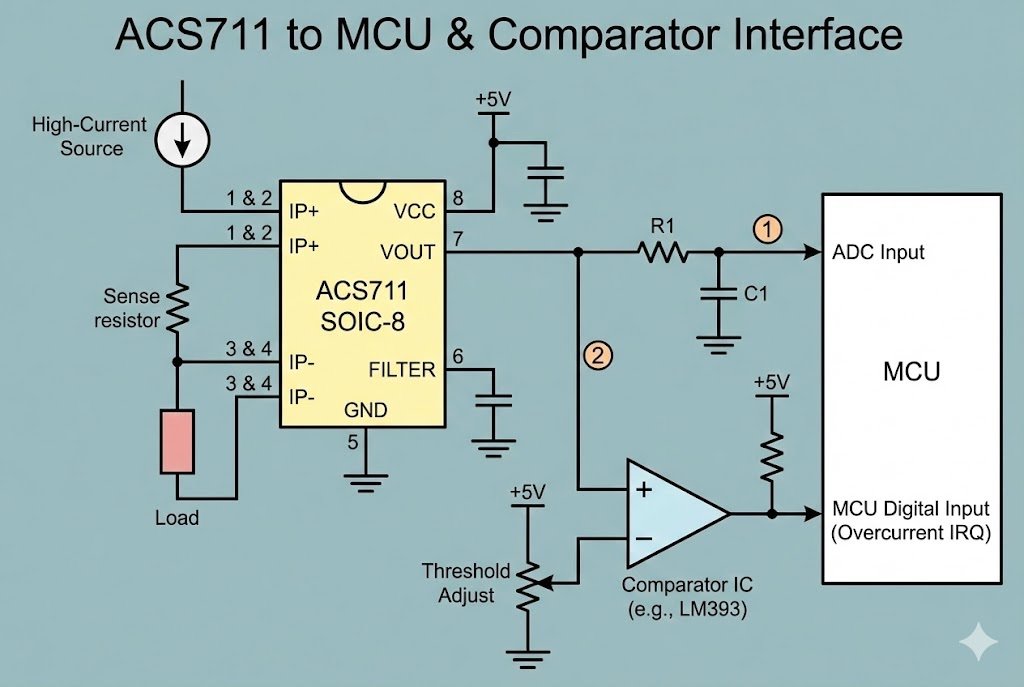
I advise my clients to look at the whole signal chain. The sensor is just the first step. You need to process that information. The ACS711 outputs an analog voltage. This voltage changes linearly with the current. At 0 Amps, the output is half of the supply voltage (VCC/2).
If you use a 3.3V supply:
- 0 Amps = 1.65V
- Positive Current = Voltage goes up.
- Negative Current = Voltage goes down.
The Bundle Strategy
At Nexcir7, we do not just sell the sensor. We recommend the parts that go with it. To get a reliable protection circuit, you often need a good Comparator or a precise ADC.
Why use a Comparator? The ADC in your microcontroller might be too slow. It takes time to sample the signal. A short circuit happens fast. A dedicated comparator chip watches the voltage constantly. When it crosses the limit, it flips a switch instantly.
Here is a list of components we often supply together with the ACS711:
- The Sensor: ACS711KLCTR-25AB-T1.
- The Comparator: Low-power, fast response (like an LM393 or similar).
- The ADC: If your MCU needs higher precision (like a 12-bit external ADC).
- The Switch: A MOSFET to cut the power.
Calculating the Trip Point
You need to do some math. The sensitivity of this part is usually around 55mV/A (depending on VCC). If you want to cut power at 20A:
- Base Voltage = 1.65V
- Change = 20A * 0.055V/A = 1.1V
- Trip Voltage = 1.65V + 1.1V = 2.75V
You set your comparator reference to 2.75V. When the sensor output hits this, the system shuts down. This simple calculation saves motors from burning out.
LOOP END
LOOP START
How Can You Reduce Noise in Your PCB Layout?
Bad layout ruins good sensors. Noise makes your protection trigger randomly, which annoys the user.
Place a bypass capacitor10 close to the device. Keep high-current traces11 away from the sensitive VIOUT signal line to prevent magnetic interference and ensure accurate readings.
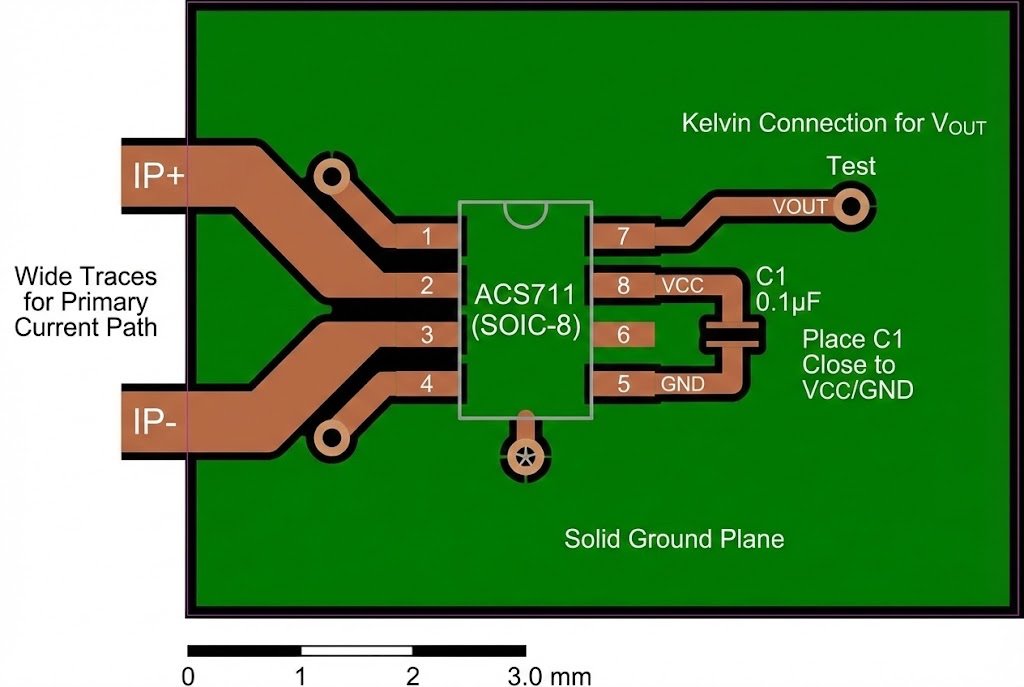
I have seen many failed designs. The sensor works on the bench but fails in the field. Usually, the problem is the PCB layout. The ACS711 measures magnetic fields. If you run other high-current wires near it, the sensor gets confused.
Critical Layout Rules
1. Isolate the High Current Path The pins IP+ and IP- carry the heavy load. You must use thick copper traces here. If the traces are too thin, they heat up. This heat travels into the chip and affects accuracy. I recommend using 2oz copper for currents above 10A.
2. Protect the Sensitive Pins The VIOUT pin is weak. It carries a small voltage signal. Do not run this trace under the chip. Do not run it near the motor wires. The noise from the motor will jump onto this line. If that happens, your MCU thinks the current is spiking when it is not. The vacuum cleaner turns off for no reason. The customer returns the product.
3. Use Bypass Capacitors You must put a capacitor between VCC and GND. It should be as close to the chip as possible. A 0.1 µF ceramic capacitor is standard. This cleans the power supply. Without it, voltage dips from the motor starting up will mess up the sensor reference.
4. Thermal Vias Since the chip is small, it has trouble getting rid of heat. You should put small holes (vias) in the copper pads. These holes connect to a large copper area on the bottom of the board. This acts like a radiator. It pulls heat away from the sensor.
Layout Checklist:
- [ ] Capacitor placed < 5mm from chip?
- [ ] High current traces wide enough?
- [ ] VIOUT trace isolated from noise?
- [ ] Ground plane solid?
Follow these rules, and your design will be stable. At Nexcir7, we help our clients review their layouts because we want the parts we supply to work perfectly.
LOOP END
LOOP START
How Do You Verify the Overcurrent Protection Works?
Designing is theory. You must prove it works in real life before you ship thousands of units.
Use a programmable electronic load12 to simulate faults. Slowly increase current past 25A and measure the response time on the FAULT pin13 or MCU output to ensure safety.
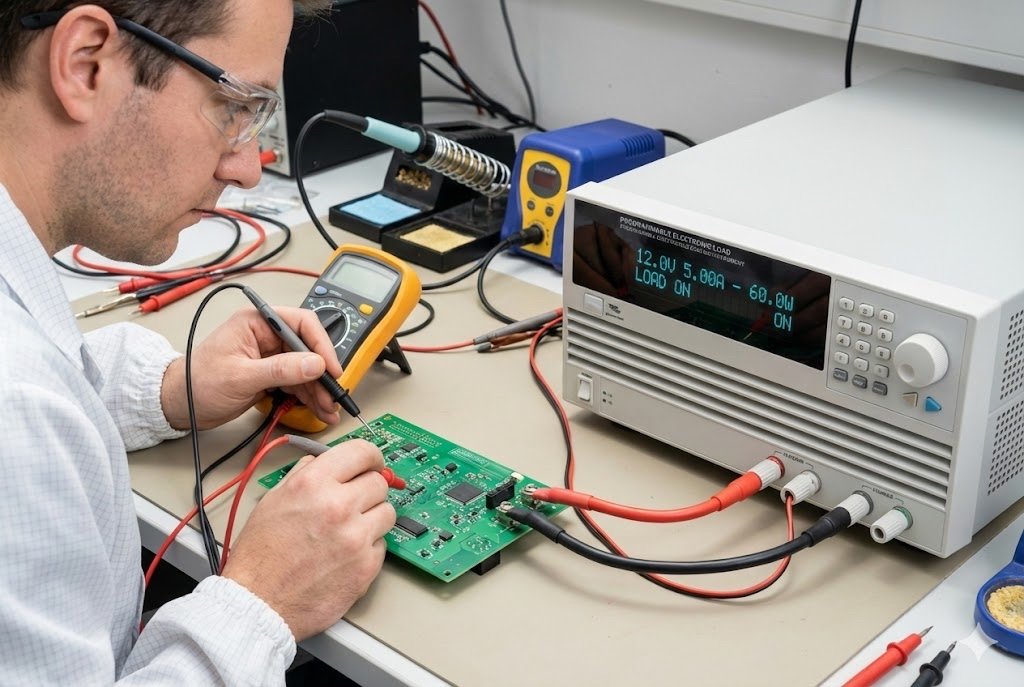
Testing is the final step. You cannot skip it. I remember a client who skipped full load testing. They assumed the datasheet was enough. Their product failed when the motor stalled. You need to simulate the worst-case scenario.
The ACS711 Fault Output
This specific chip has a nice feature. It has a pin called $overline{FAULT}$. If the current gets too high for the chip to measure (overcurrent), this pin goes low. This is a digital flag. You can connect this directly to an interrupt pin on your MCU.
Step-by-Step Testing Plan
Step 1: Static Accuracy Test Connect a stable power supply and an electronic load. Set the current to 5A, 10A, 15A, and 20A. Measure the voltage at VIOUT with a multimeter.
- Does it match your calculation?
- Is it linear?
Step 2: The Step Response You need an oscilloscope14 for this. You want to see how fast the sensor reacts. Switch the load from 0A to 20A instantly. Watch the VIOUT pin on the scope. It should rise quickly. The datasheet says 3.5 µs rise time. Verify this. If it is slow, you might have too much capacitance on the output line.
Step 3: Thermal Soak Run the device at 20A for one hour. Does the output drift? As the chip gets hot, the reading might change slightly. You need to know how much. If it drifts too much, you might need to adjust your software to compensate for temperature.
Step 4: The Short Circuit Test This is the dangerous one. Use a real motor. Lock the rotor (hold it so it cannot turn). This creates a massive current spike. Does your protection circuit cut the power before the motor smokes? Does the ACS711 survive?
At Nexcir7, we source original parts to ensure they pass these tests. Counterfeit parts often fail at Step 3 or Step 4. They cannot handle the heat or the voltage spikes. Genuine ACS711 chips from Allegro are robust. We ensure our clients get the real deal so their testing goes smoothly.
LOOP END
Conclusion
To design safe electronics, use the ACS711 with a clean layout, proper bypass capacitor10s, and a paired comparator for fast switching.
Understanding the ACS711KLCTR-25AB-T is crucial for designing effective overcurrent protection in electronics. ↩
Learn about linear current sensor ICs to see how they can be applied in various electronic designs. ↩
Discover how to integrate a comparator or MCU with a current sensor for enhanced circuit protection. ↩
Reducing signal noise is essential for accurate sensor readings and reliable circuit performance. ↩
Explore the benefits of the SOIC-8 package for compact electronic designs. ↩
Low internal conductor resistance minimizes heat generation, crucial for compact devices. ↩
Nexcir provides reliable sourcing and support for electronic components, ensuring quality and performance. ↩
Understanding Hall-effect sensors helps in selecting the right sensor for non-contact current measurement. ↩
Learn how a copper conduction path aids in efficient current measurement in sensors. ↩
Bypass capacitors are vital for stabilizing voltage and reducing noise in electronic circuits. ↩
Proper design of high-current traces ensures efficient current flow and reduces heat in PCBs. ↩
Using a programmable electronic load is essential for simulating faults and testing circuit robustness. ↩
The FAULT pin provides a digital signal for overcurrent conditions, enhancing circuit protection. ↩
An oscilloscope is key for observing signal changes and verifying sensor response times. ↩