Network designs fail when the physical connection is unstable. You worry about signal noise1 and running out of space on your PCB, which hurts your production schedule.
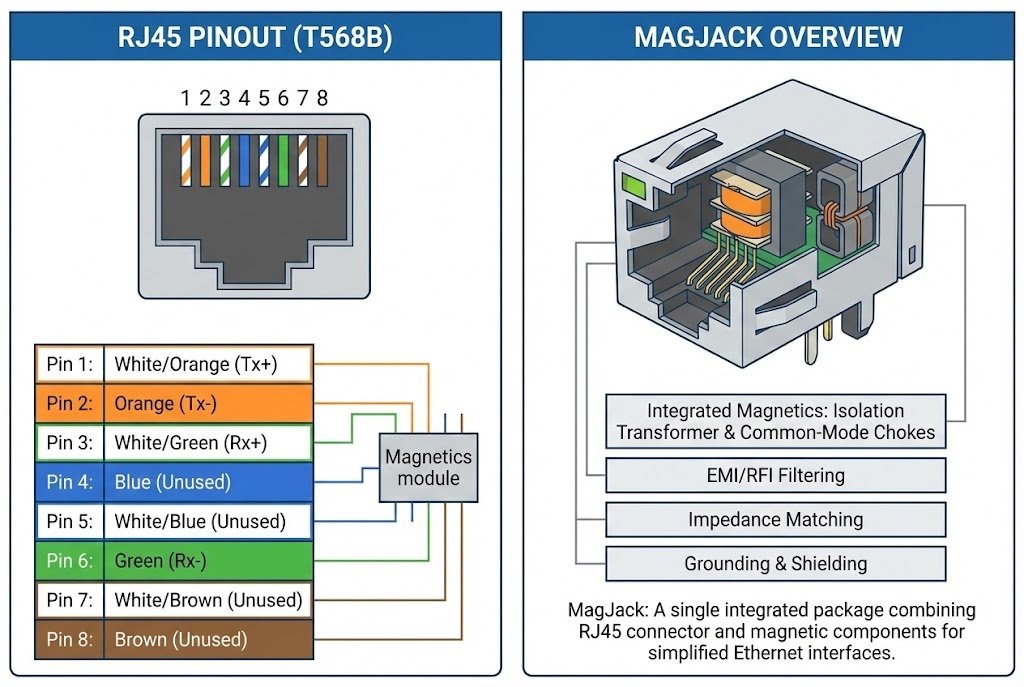
An RJ45 pinout2 defines the wiring scheme, usually T568B3, for Ethernet data transmission. An Integrated MagJack4k](https://www.glgnet.biz/articledetail/rj45-with-magnetics-vs-standard-rj45-which-one-should-you-use-in-2025.html)%%%FOOTNOTE_REF_5%%% combines this standard connector with internal magnetic transformers. This integration filters noise, provides necessary electrical isolation, and saves significant PCB space6 compared to using separate components.
I see many engineers struggle with the choice between discrete parts and integrated solutions. I want to explain the basics of the pinout and then show you why an integrated socket is a better choice for your business.
What is the Standard RJ45 Pinout Configuration?
You connect a cable, but the link lights do not turn on. Wiring mistakes cause major headaches during the testing phase, and you need to know the standards to avoid them.
The RJ45 connector usually uses 8 pins. The two main standards are T568A and T568B3. They determine the order of the color-coded wires. T568B3 is the most common standard in commercial cabling. It ensures the transmit and receive pairs align correctly.
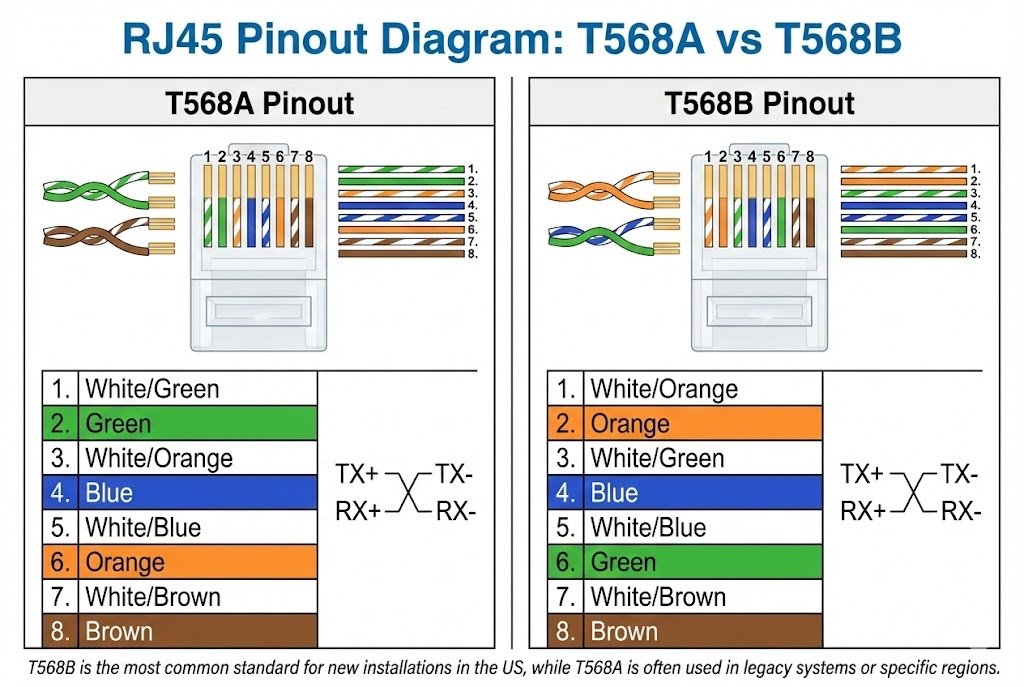
I have seen many junior engineers get confused by the pinout standards. It is crucial to understand that the physical connector is the same, but the wiring order changes. In most modern networking equipment, we rely on T568B3. This is the standard I recommend you follow unless your specific project requires T568A.
When we look at the pinout, we are looking at how data moves. In a standard 10/100 Mbps connection, we only use two pairs of wires. One pair transmits data (TX), and the other pair receives data (RX). However, for Gigabit Ethernet7 (1000Base-T), we use all four pairs. This makes the pinout definition even more critical. If you get one wire wrong in a Gigabit design, the speed drops or the link fails completely.
Here is a simple breakdown of the standard T568B3 pinout that I use for reference:
| Pin Number | Signal (10/100 Base-T) | Signal (1000 Base-T) | Wire Color (T568B3) |
|---|---|---|---|
| 1 | TX+ | BI_DA+ | White/Orange |
| 2 | TX- | BI_DA- | Orange |
| 3 | RX+ | BI_DB+ | White/Green |
| 4 | Unused | BI_DC+ | Blue |
| 5 | Unused | BI_DC- | White/Blue |
| 6 | RX- | BI_DB- | Green |
| 7 | Unused | BI_DD+ | White/Brown |
| 8 | Unused | BI_DD- | Brown |
I also want to mention MDI and MDI-X. In the past, you needed a "crossover cable" to connect two computers directly. Now, most PHY chips have Auto-MDIX8. This feature automatically detects the cable type and swaps the TX and RX pairs internally. But even with this feature, you must layout your PCB tracks correctly to match the RJ45 footprint9.
Why Is the Ethernet Transformer (Magnetics) Essential for Your Circuit?
Signal interference can destroy data integrity and cause packet loss. Without protection, your expensive PHY chip might burn out from high voltage spikes or static electricity.
Ethernet magnetics10 provide signal isolation and impedance matching. They protect the PHY chip from voltage faults and reduce electromagnetic interference (EMI). Without these transformers, Ethernet communication would be unreliable and prone to damage from static or ground loops.
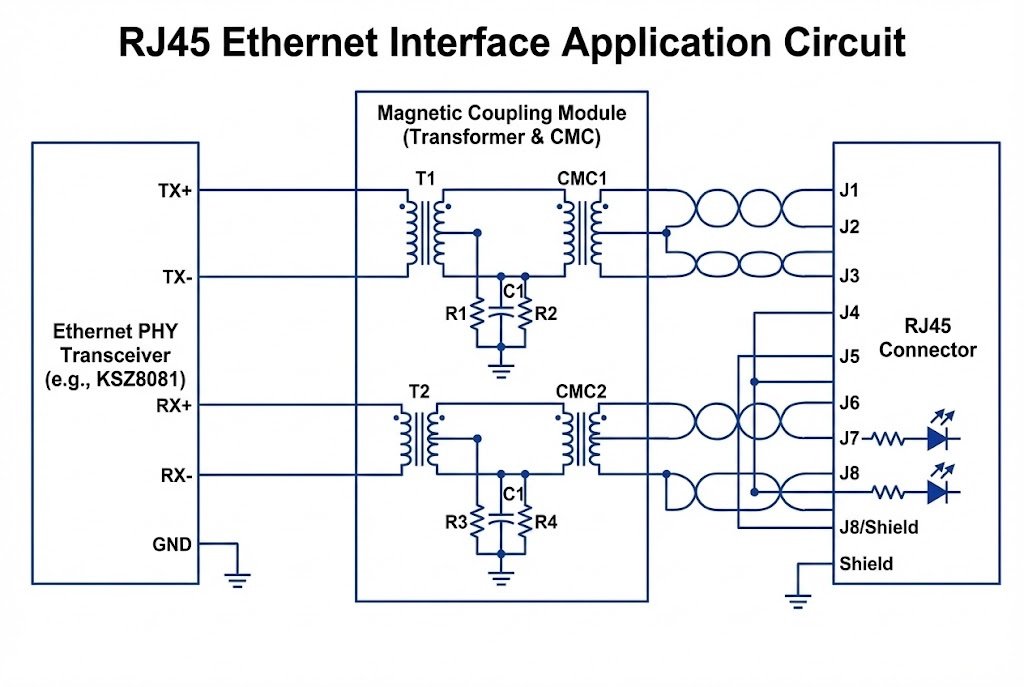
I cannot stress enough how important "Magnetics" are. You might think it is just a simple coil, but it performs three critical jobs. First, it provides isolation. The cable runs long distances. It might pick up high voltages or ground differences between two buildings. The transformer stops this voltage from entering your board and frying your main processor.
Second, it handles Common Mode Rejection11. This is a technical way of saying it filters out noise. Electronic environments are noisy. Motors, power supplies, and other devices create interference. The magnetics ensure that only the clean data signal gets through to your chip.
Third, it manages Impedance Matching12. Your Ethernet cable has a specific resistance (100 ohms). Your chip might be different. The transformer acts like a gearbox in a car, matching the engine to the wheels. This ensures maximum power transfer and minimal signal reflection.
I often explain it this way: The PHY chip is the brain, and the RJ45 is the mouth. The magnetics are the filter mask in between. They keep the bad stuff out and let the clear voice through. If you design a board without proper magnetics, you will fail compliance testing. Your device will emit too much radio noise (EMI), and regulators will not let you sell it. This is why every Ethernet port needs a transformer.
Why Should You Choose an Integrated MagJack4k](https://www.glgnet.biz/articledetail/rj45-with-magnetics-vs-standard-rj45-which-one-should-you-use-in-2025.html)%%%FOOTNOTE_REF_5%%% Over Discrete Components?
PCB space6 is expensive and limited in modern compact devices. Routing traces between a connector and a separate transformer is difficult and adds noise risks.
An Integrated MagJack4k](https://www.glgnet.biz/articledetail/rj45-with-magnetics-vs-standard-rj45-which-one-should-you-use-in-2025.html)%%%FOOTNOTE_REF_5%%% (RJ45 with built-in magnetics) places the transformer inside the connector housing. This reduces component count, saves board space, and improves signal integrity by shortening the signal path. Brands like Pulse and Bel Fuse13 offer reliable options.
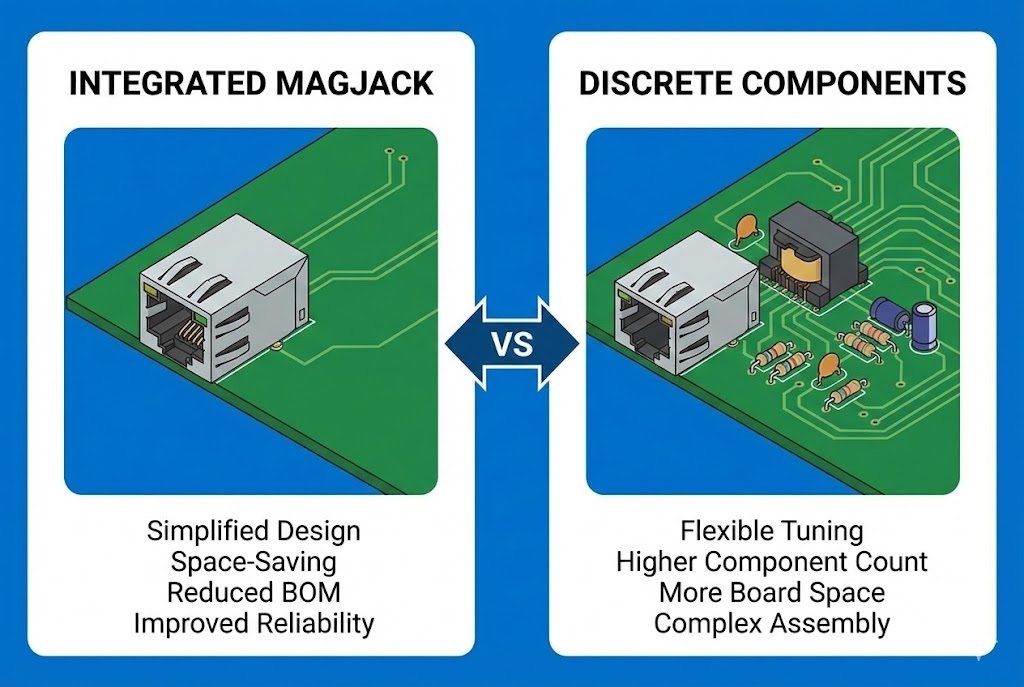
I strongly believe that for most new designs, the Integrated MagJack4k](https://www.glgnet.biz/articledetail/rj45-with-magnetics-vs-standard-rj45-which-one-should-you-use-in-2025.html)%%%FOOTNOTE_REF_5%%% is the superior choice. I have worked with clients at Nexcir who tried to save a few cents by buying a cheap plastic connector and a separate transformer module. They usually regret it.
When you use discrete components, you have to route tracks from the connector pins to the transformer, and then to the PHY chip. These tracks act like antennas. They pick up noise. By using a MagJack5, the distance between the pin and the transformer is almost zero. This keeps the signal very clean.
Let's look at the business side, which I handle daily. The assembly cost is lower. You only place one part on the board instead of two or three. This simplifies your Bill of Materials (BOM)14. Leading brands like Pulse Electronics and Bel Fuse13 are the gold standard here. Their MagJack5s are robust and tested for long-term reliability.
Here is a comparison I made to help you decide:
| Feature | Discrete (Separate Parts) | Integrated MagJack4k](https://www.glgnet.biz/articledetail/rj45-with-magnetics-vs-standard-rj45-which-one-should-you-use-in-2025.html)%%%FOOTNOTE_REF_5%%% |
|---|---|---|
| PCB Space | Requires more space. | Compact, saves up to 50% space. |
| Signal Integrity | Risk of noise on PCB traces. | Excellent, shortest signal path. |
| EMI Performance15 | Harder to control. | Better, shielding is built-in. |
| Assembly | Two placements (Connector + Transformer). | One placement (Faster assembly). |
| Reliability | More solder joints to fail. | Higher, fewer external points of failure. |
At Nexcir, we supply these integrated solutions because they offer better value. While the unit price of a MagJack5 might look higher than a plain plastic socket, the total cost of ownership—including space savings, lower failure rates, and faster assembly—is much lower.
How Do You Select the Right MagJack5 for Your Specific Application?
Picking the wrong part leads to costly redesigns and production delays. You need to match the connector to your speed, power, and mechanical requirements.
To choose the right MagJack5, you must define the speed (10/100, 1Gb, 10Gb) and check if you need Power over Ethernet (PoE)16. You also need to verify the latch orientation and the LED color requirements17 for status indication.
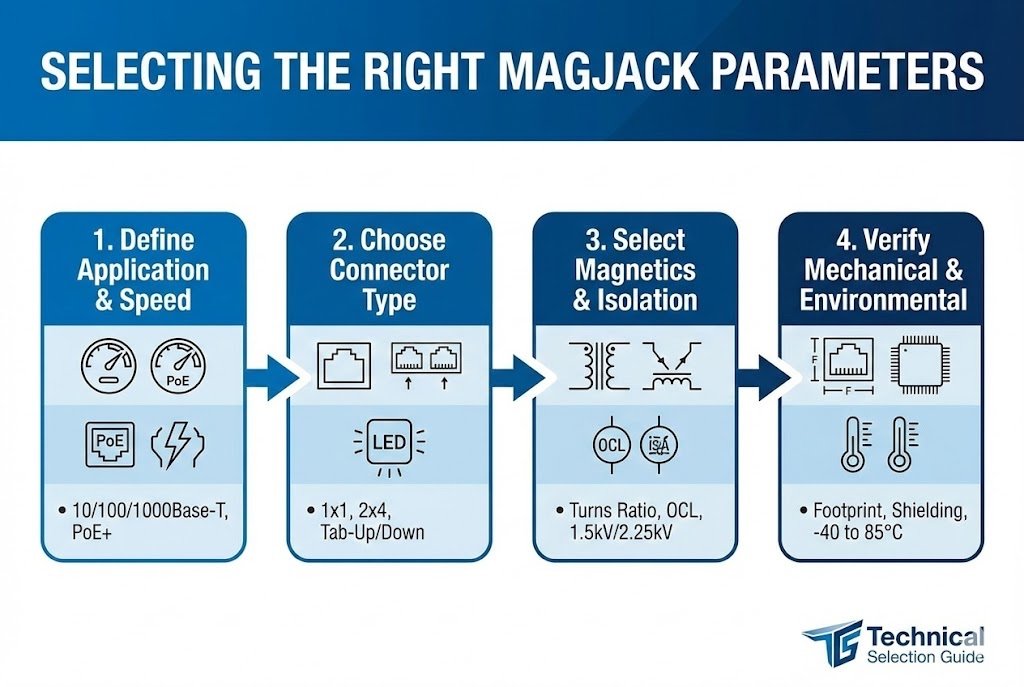
I help customers select these components every day. The variety can be overwhelming. You cannot just pick any "RJ45" from a catalog. You need to look at the schematic of your PHY chip first. Different chips require different transformer turns ratios. If you match the wrong MagJack5 to your chip, the Ethernet link will not work.
Here is my checklist for selecting the right part:
- Speed: Is your application 10/100 Mbps, 1 Gigabit, or faster? A 10/100 MagJack5 will not work for Gigabit because it lacks the extra wire pairs and frequency response.
- PoE Capability: Do you need to power a camera or phone through the cable? You must choose a MagJack5 rated for PoE (Power over Ethernet). If you use a non-PoE jack for a powered application, the internal coils will overheat and fail.
- Shielding: Does your device have a metal case or a plastic case? If you have a metal case, you usually need "EMI fingers" (little metal tabs) on the jack to ground it to the panel.
- Orientation: Look at your board. Does the tab of the cable need to face up or down? We call this "Tab Up" or "Tab Down." This is purely mechanical but vital for user access.
- LEDs: Do you need built-in lights to show activity? Common colors are Green/Yellow. Some jacks have no LEDs.
I recently helped an industrial client who needed a rugged connector for a factory floor. We moved them to a Bel Fuse13 MagJack5 with extended temperature range support. It solved their field failure issues immediately. Whether you need a standard part or a high-end Pulse connector, checking these specs early prevents panic later.
Conclusion
Understanding the RJ45 pinout2 and using Integrated MagJack4k](5s">https://www.glgnet.biz/articledetail/rj45-with-magnetics-vs-standard-rj45-which-one-should-you-use-in-2025.html)5s ensures reliable data transmission and simpler PCB layout. At Nexcir, we help you source authentic, high-performance connectors from trusted brands like Pulse and Bel Fuse13 to secure your network designs.
Learn about the impact of signal noise on data integrity and how to mitigate it in your designs. ↩
Understanding the RJ45 pinout is crucial for ensuring proper Ethernet connections and avoiding costly wiring mistakes. ↩
Explore the T568B standard to learn how it ensures correct data transmission in commercial cabling. ↩
Discover how Integrated MagJacks can save PCB space and improve signal integrity in your designs. ↩
Explore the advantages of MagJacks over traditional connectors for improved performance. ↩
Understanding the importance of PCB space can help you make better design choices and optimize your layout. ↩
Learn about the specific requirements for Gigabit Ethernet to ensure high-speed data transmission. ↩
Discover how Auto-MDIX technology eliminates the need for crossover cables in modern networking. ↩
Understanding the RJ45 footprint is essential for ensuring proper layout and connectivity. ↩
Explore how Ethernet magnetics provide essential protection against voltage spikes and signal interference. ↩
Learn about Common Mode Rejection and its importance in filtering out noise in electronic environments. ↩
Understanding impedance matching can help ensure maximum power transfer and minimal signal reflection. ↩
Explore the reliability and performance of Bel Fuse connectors for your networking needs. ↩
Understanding the BOM can help streamline your design process and reduce costs. ↩
Explore the importance of EMI performance in ensuring your device meets regulatory standards. ↩
Learn about PoE technology and its applications in powering devices through Ethernet cables. ↩
Learn about LED color requirements to enhance user experience and device functionality. ↩