Are your old screens failing? Fixing them is hard without the right wire details. I will show you the exact VGA pin layout1 to solve your display problems fast.
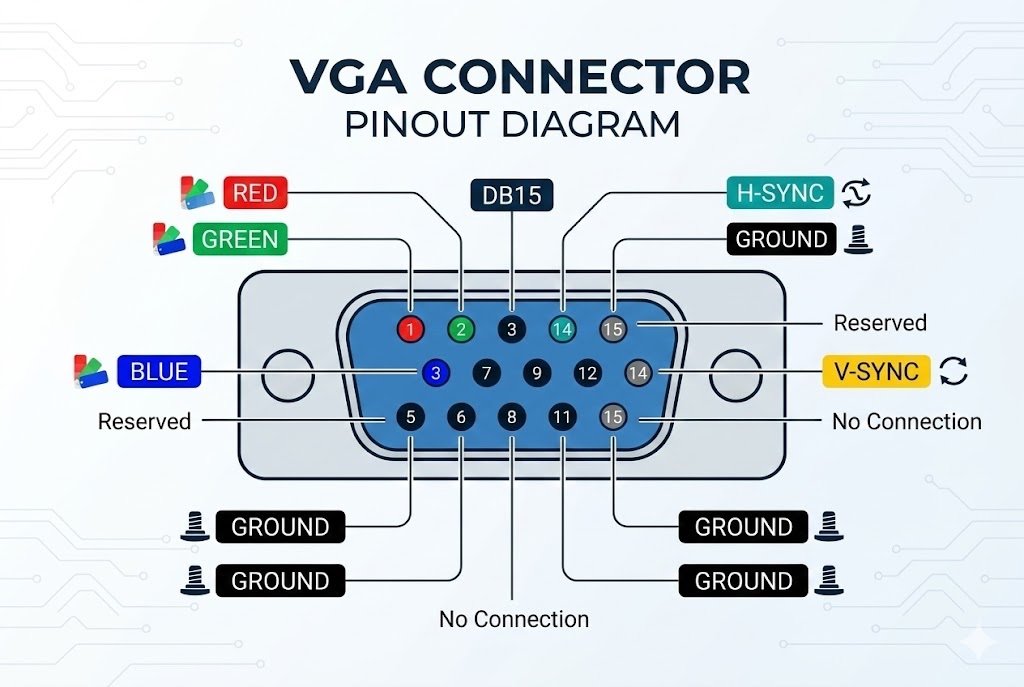
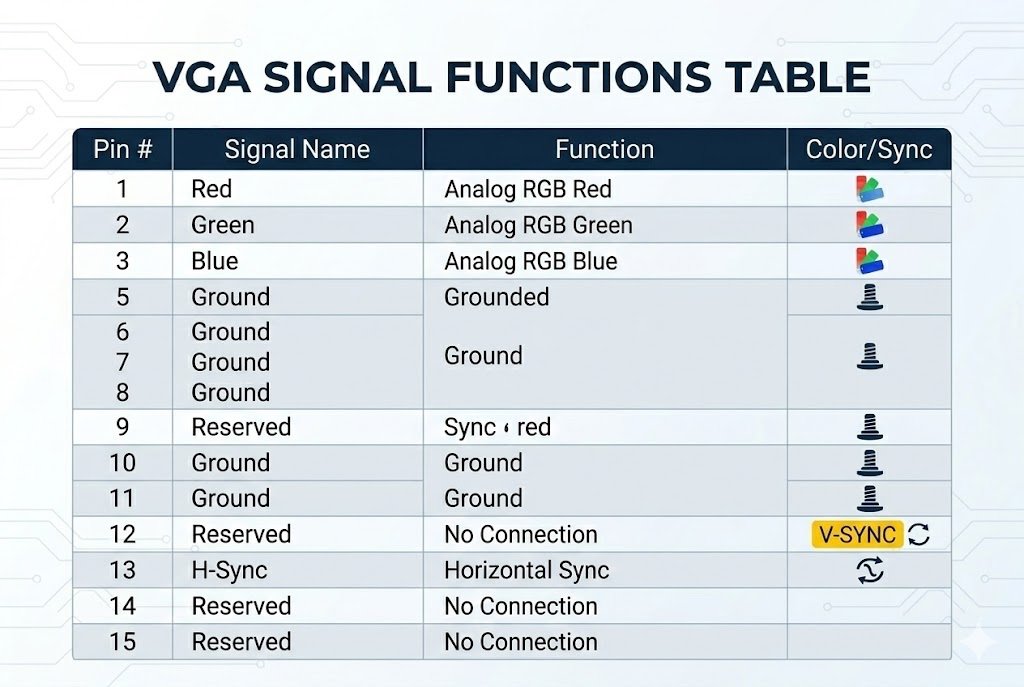
A VGA connector has 15 pins arranged in three rows. Pins 1, 2, and 3 carry red, green, and blue video signals2. Pins 13 and 14 handle horizontal and vertical sync3. Understanding this layout helps you repair displays and build custom cables easily.
You might think VGA is dead. It is still everywhere in factories. We will look closely at how these pins work. You can fix your next broken monitor without guessing after reading this.
What Are the Signal Functions in a Standard VGA Pinout?
Do you mix up video wires? Plugging the wrong pin causes screen errors. You must know what each pin does to avoid damaging your equipment.
The standard VGA connector uses pins 1 to 3 for RGB color signals. Pins 6 to 8 are ground returns4 for these colors. Pins 13 and 14 control the image timing through horizontal and vertical sync3. Pin 9 supplies 5V power to the display chip5.
Breaking Down the 15 Pins
We must look at all 15 pins to understand the VGA connector. I remember fixing an old factory machine. The screen was completely red. I knew right away that pin 1 had a short circuit. You save hours of testing by knowing the pin functions.
The 15 pins divide into three main groups. These groups are color signals, ground lines, and control lines. The color signals send the actual picture. The ground lines stop noise from ruining the image. The control lines tell the screen when to draw the picture.
Here is a clear breakdown of the most important pins:
| Pin Number | Signal Name | Function Description |
|---|---|---|
| 1 | Red | Sends the red color video signal. |
| 2 | Green | Sends the green color video signal. |
| 3 | Blue | Sends the blue color video signal. |
| 6, 7, 8 | RGB Ground | Provides ground for the color signals to stop noise. |
| 13 | H-Sync | Controls the horizontal drawing speed. |
| 14 | V-Sync | Controls the vertical drawing speed. |
You must shield the RGB lines6 when you build a custom cable. The picture will look fuzzy if you do not shield them. I always check the ground pins first when a customer complains about poor image quality. Good grounding fixes most signal problems quickly.
How Do You Read a VGA Wiring Diagram?
Wiring a VGA plug is confusing. One wrong wire ruins the whole cable. Reading the diagram correctly saves you from wasting parts and time.
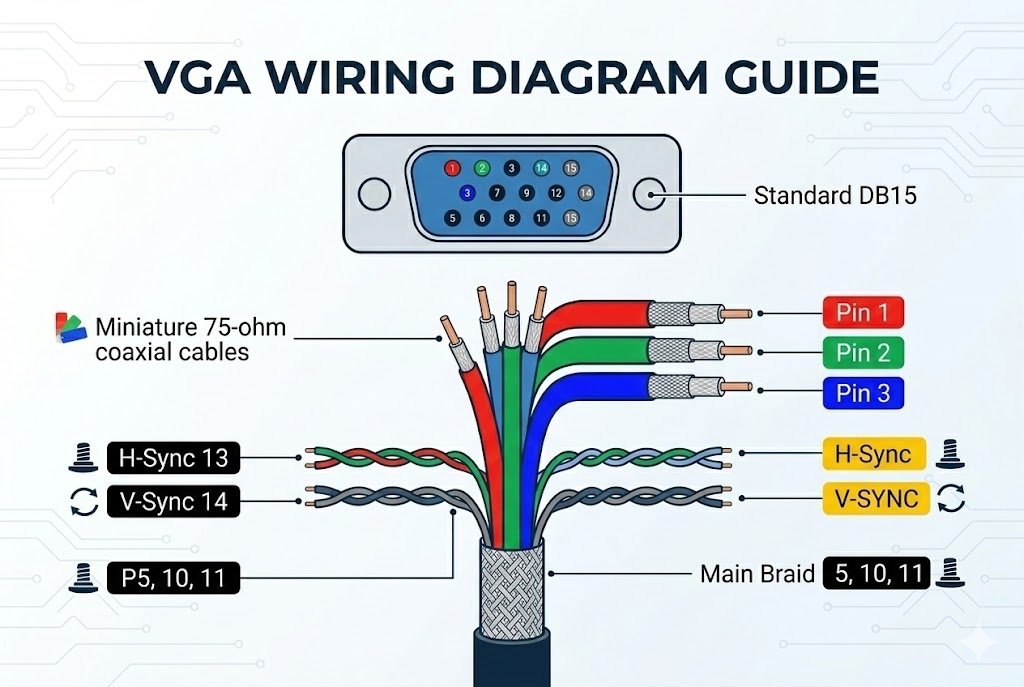
You read a VGA wiring diagram7 by looking at the numbers on the connector face. The numbers go from 1 to 5 on the top row, 6 to 10 in the middle, and 11 to 15 on the bottom. Always match the cable wire colors to these exact pin numbers.
Matching Wires to Pins
Reading a wiring diagram is a basic skill for hardware engineers. I once helped a client. This client bought cheap cables. The cables did not match the standard diagram. The machines failed to start. We had to rewire everything. This story shows why standard diagrams matter.
A good wiring diagram shows both the male plug and the female socket. You must know which one you are looking at. You see pin 1 on the top left when you look at the front of the male plug. You see pin 1 on the top right when you look at the back. You solder the wires on the back. This simple flip causes many mistakes.
Let us look at common wire colors used in standard VGA cables:
| Pin Group | Standard Wire Color | Purpose |
|---|---|---|
| Pins 1, 2, 3 | Red, Green, Blue (Thick) | Carries the main video data. |
| Pins 6, 7, 8 | Inner Shields | Protects the color data from outside noise. |
| Pins 13, 14 | Black, Yellow (Thin) | Carries the sync signals. |
| Outer Shell | Braided Metal | Connects to the main ground for safety. |
You must solder the thick wires carefully. They carry high-frequency signals. The screen will flicker if your solder joint is bad. Always double-check your work against the diagram. You must do this before you plug the cable into an expensive machine.
How Can You Troubleshoot Industrial Monitors Using H-Sync and V-Sync?
A rolling screen stops factory work. Finding the exact fault is stressful. You can find the problem quickly by testing the H-Sync and V-Sync signals8.
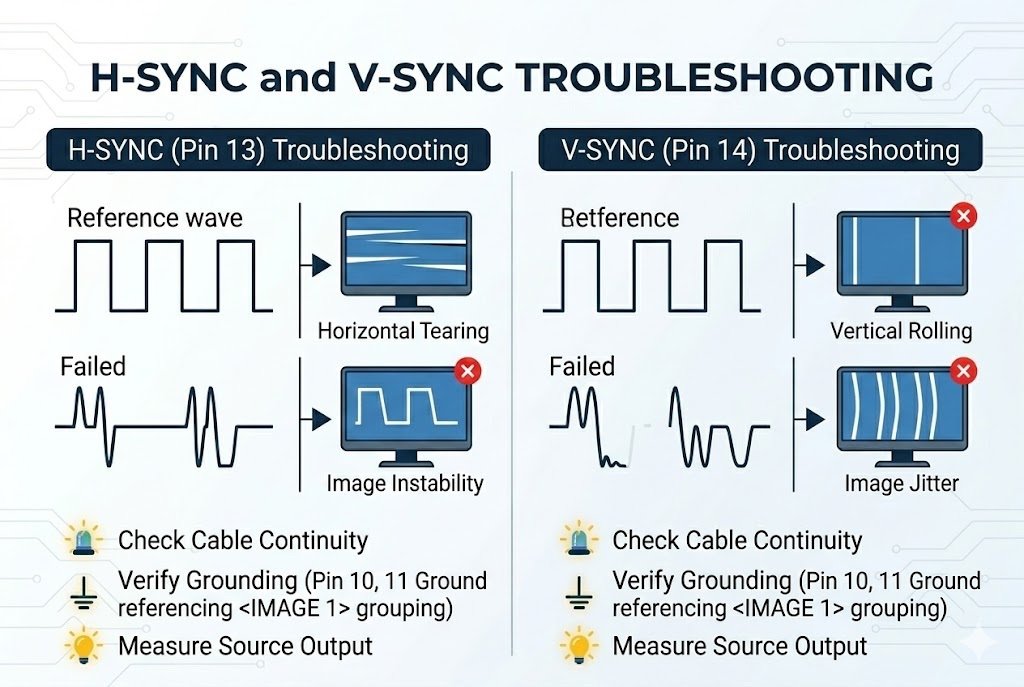
You troubleshoot monitors9 by checking pins 13 and 14 with an oscilloscope. Check the V-Sync signal if the image rolls up and down. Check the H-Sync signal if the image tears side to side. Missing sync signals mean the display controller chip is failing.
Fixing Sync Signal Failures
Industrial monitors often run 24 hours a day. They get hot. Components fail. I often get calls from factory managers with broken screens. They think the whole monitor is dead. The problem is usually just a bad sync signal.
The H-Sync tells the screen when to start a new line. The V-Sync tells the screen when to start a new frame. The screen cannot draw the picture if these signals are weak. The screen cannot draw the picture if these signals are missing. You can use a multimeter or an oscilloscope to find the fault.
Here is a simple guide to sync signal problems:
| Symptom on Screen | Likely Cause | Action to Take |
|---|---|---|
| Image rolls vertically | V-Sync (Pin 14) is missing. | Check the wire on Pin 14 for breaks. |
| Image tears horizontally | H-Sync (Pin 13) is missing. | Check the wire on Pin 13 for breaks. |
| "No Signal" message | Both Syncs are missing. | Check the main display controller IC. |
| Picture is shifted | Wrong sync timing. | Adjust the monitor settings or check the source. |
Do not just change the cable when you find a bad sync signal. The problem is sometimes the IC on the main board. We supply original replacement display ICs at Nexcir10. We make sure you get authentic parts to fix these exact problems.
Why Are VGA Connectors Still Used in Modern Industrial Applications?
Upgrading old factory machines is too expensive. Broken new parts cause long delays. VGA stays in use because it is tough, cheap, and very easy to fix.
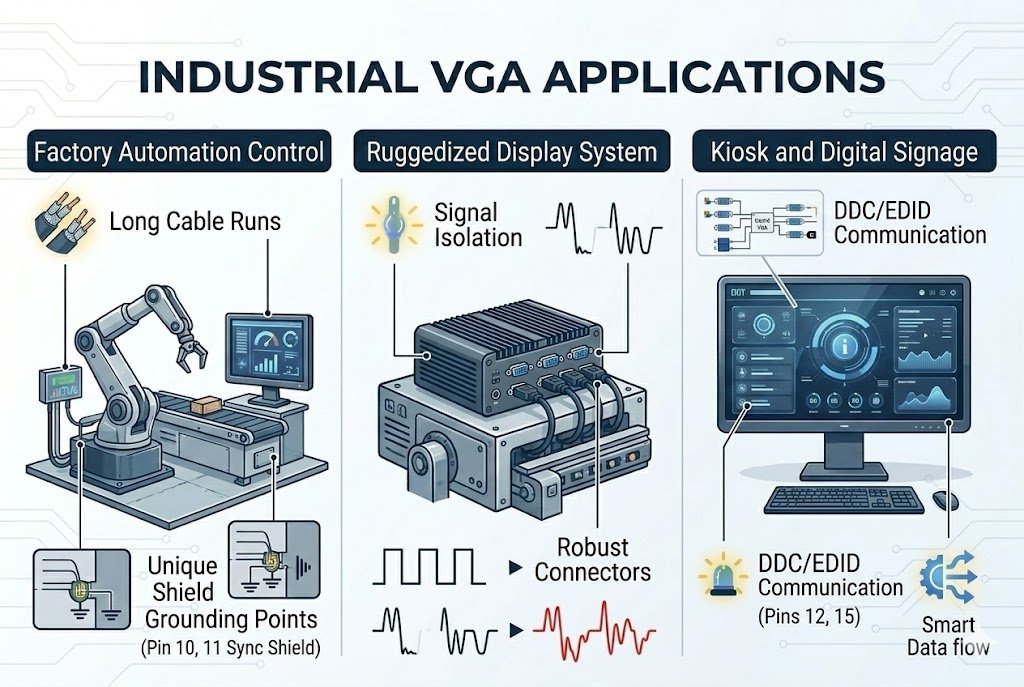
VGA connectors are still used in factories because they lock tightly with screws. This stops them from falling out when machines vibrate. The analog signal11 travels longer distances without complex active chips. Many older industrial motherboards only support VGA. This makes VGA necessary for direct replacements.
The Value of Legacy Connections
Many people ask me why we still talk about VGA. They think HDMI or DisplayPort is always better. That is true in a clean office. VGA is often the better choice in a dirty factory. I have seen HDMI cables fall out of machines. Engine vibration causes them to fall out.
VGA uses two screws to lock into the port. This physical lock is very important for industrial use. Also, analog signal11s do not have digital handshake problems. It usually just works when you plug it in. This saves a lot of time for maintenance workers.
Let us compare VGA with modern connectors in an industrial setting:
| Feature | VGA | HDMI / DisplayPort |
|---|---|---|
| Locking Mechanism | Yes (Screws) | Rare (Friction or small clips) |
| Signal Type | Analog | Digital |
| Plug-and-Play Reliability | High (No digital handshake) | Medium (EDID issues common) |
| Max Cable Length | Up to 15 meters | Usually under 5 meters |
Many OEM hardware engineers still put VGA ports on new industrial equipment for these reasons. They know their customers need reliable connections. These connections must last a long time. You need stable DAC chips when you design a board with a VGA output. We help our clients find these specific chips easily.
How Do You Source High-Quality VGA Components and Related ICs?
Fake chips ruin your production run. Finding old parts is a big headache. You need a safe supply chain to get real parts on time and keep working.
You source high-quality components by using trusted global distributors. Always buy from companies that trace parts back to original makers. Look for suppliers who offer stable pricing12 and check parts for fakes. This ensures your industrial boards and VGA circuits work perfectly every time.
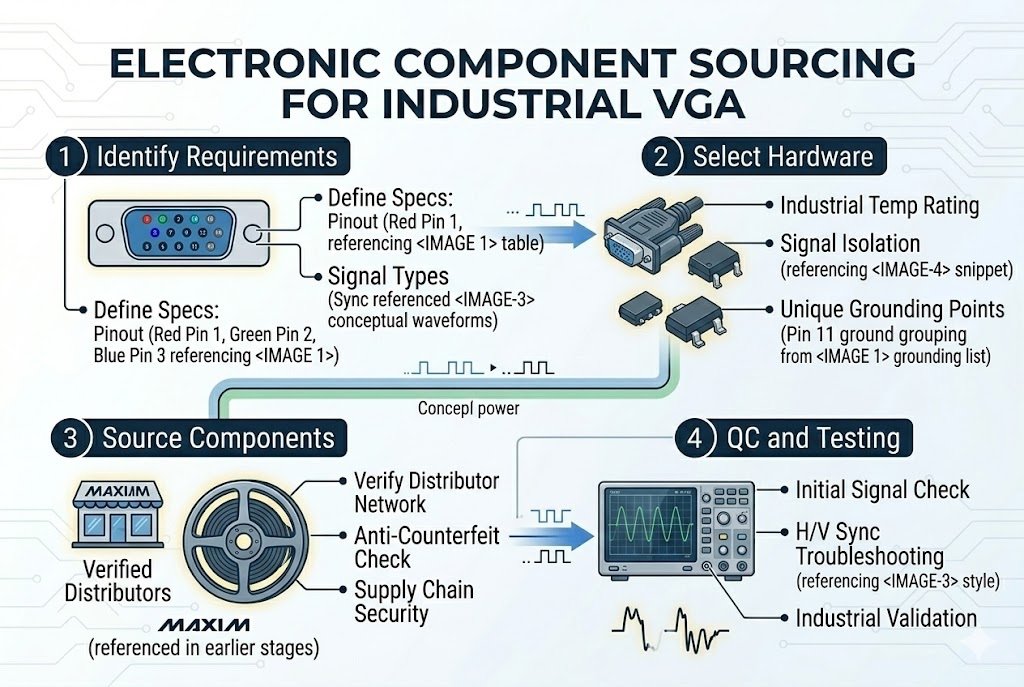
Securing Your Supply Chain
Finding the right parts for legacy systems is hard. Some parts are marked as Not Recommended for New Design. I talk to procurement managers every day. They worry about buying fake chips13 from open markets. Fake chips cause machines to fail. Fake chips destroy your brand trust.
We solve this problem at Nexcir10. Our team has over 20 years of experience. We know how to find the exact MCUs and display ICs you need. We only use authorized channels. Every part we ship is completely original.
Here is how we protect your procurement process:
| Customer Pain Point | The Nexcir10 Solution |
|---|---|
| Fake electronic parts | Full traceability to original manufacturers14. |
| High market prices | Stable pricing through bulk global sourcing. |
| Long delivery times | Fast global logistics and flexible shipping. |
| Obsolete (EOL) parts | Expert help finding safe and working alternatives. |
You cannot take risks with bad components when you build industrial displays. A small fake chip can stop a whole factory line. We make sure you get the right parts. We give you the right price. We deliver exactly when you need them. We want to be your long-term partner.
Conclusion
You fix screens fast when you know the VGA pinout. Testing sync signals saves hours of work. Buying real parts keeps your systems running. We support your daily electronic needs.
Understanding the VGA pin layout is crucial for repairing displays and building custom cables efficiently. ↩
Knowing how RGB signals function helps in troubleshooting color display issues effectively. ↩
Sync signals are vital for image timing, ensuring your display draws images correctly. ↩
Ground returns prevent noise interference, maintaining image quality on your display. ↩
The 5V power supply is essential for powering the display chip, ensuring proper functionality. ↩
Shielding RGB lines prevents image fuzziness, ensuring clear and stable video output. ↩
Reading a VGA wiring diagram correctly prevents wiring mistakes, saving time and resources. ↩
Sync signals are crucial for proper image alignment, preventing rolling or tearing screens. ↩
Troubleshooting with sync signals can quickly identify and resolve display issues, minimizing downtime. ↩
Nexcir provides reliable sourcing solutions, ensuring you receive authentic and timely components. ↩
Analog signals in VGA allow for longer cable runs without complex electronics, ideal for industrial use. ↩
Stable pricing helps in budgeting and planning, ensuring cost-effective procurement. ↩
Fake chips can lead to system failures, making it crucial to source components from trusted suppliers. ↩
Traceability ensures authenticity, reducing the risk of counterfeit parts in your supply chain. ↩