Why a Written Parameter Checklist Belongs in Every RFQ
An RFQ for a single component is still a document that several people read — the buyer who writes it, the sourcing team that sends it out, and whoever checks the responses when they come back. If the parameters are scattered across emails or implied by the subject line of the request, each reader works from a slightly different version of the requirement.
A written checklist fixes that. Each line names one parameter, records the documented value, and stays in the same order every time the request is reused. The orderable part number ACS711KEXLT-31AB-T sits at the top as the anchor, and the five parameters covered in this article follow it in a fixed sequence.
The checklist also gives sourcing a reference point when a response comes back with a value that does not match. There is a written line to compare against, rather than someone's memory of what was asked two weeks earlier.

Lead With the Complete Orderable Part Number
Before any other line, write the complete orderable part number: ACS711KEXLT-31AB-T. Not a shortened form, not a family name, and not a number that looks close.
It comes first because it is the line that tells the reader which device every other parameter belongs to. A voltage window, a current figure, a package and a temperature range are only meaningful attached to the number written above them. A response built against a trimmed or mistyped number can match every other line on the page while describing a different device.
Ask for the number to be repeated back in the response. Comparing the string the buyer sent with the string the supplier returns is a mechanical check, and it catches a dropped or transposed character before the response is filed.
Document the Operating Voltage Window
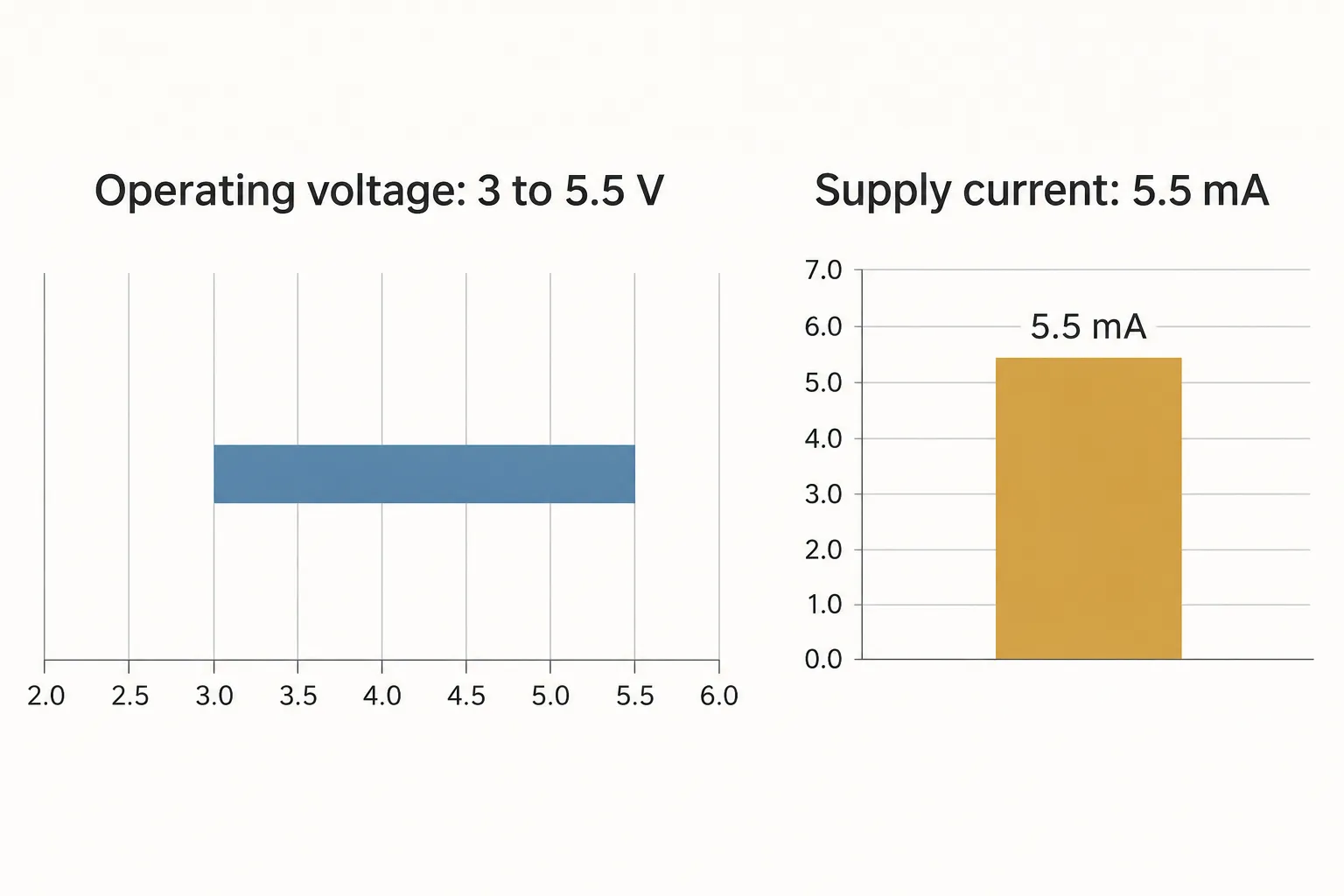
The documented operating voltage for ACS711KEXLT-31AB-T is 3 to 5.5 V. Write both endpoints on the RFQ rather than a single nominal figure.
The buyer's reason is practical: the board has a rail, and the device has to work on it. Recording the window lets sourcing screen a response against that rail without reopening the datasheet, and an answer that falls outside the window is visible immediately instead of being discovered at design review.
Writing the range as two numbers also removes an ambiguity that a single figure creates. A request that names only one voltage leaves the rest of the window unstated, and the next person to read the checklist cannot tell whether that figure is an endpoint or a centre point. Both endpoints, one unit, one line.
Record the Supply Current Requirement
The documented supply current is 5.5 mA. Put it on the RFQ as a written figure with its unit, on the same line as the voltage window it applies to.
For the buyer, this is a screening value. It states what the device draws from the board rail, so the sourcing team has something concrete to read when responses arrive. A current figure in a response that does not match the documented value is a reason to query the part, not something to reconcile quietly in a spreadsheet after the order is placed.
The unit matters as much as the number. A figure written without mA can be read in more than one way, and the checklist then loses the one property that made it useful: every reader seeing the same value.
Specify Package and Pin Count as One Line
Package style and pin count describe one physical object, so they belong on one line: 12-Contact QFN, 12 pins. Splitting them apart invites a response that matches one half and not the other.
The footprint on the board is cut for a specific body and a specific contact count. A body with the wrong number of contacts will not land on that footprint, and the mismatch is only discovered after the part has been ordered. Writing the two facts together turns the package and its pin count into a single checkable requirement rather than two loosely related notes.
Read responses the same way. A matching package name carrying a different pin count is a mismatch, not a near miss.
State the Operating Temperature Range
The documented operating temperature range is –40 to 125 °C. Record the full range on the RFQ, both endpoints, with the unit.
This is the line that describes the environment the device is expected to work in, and it is the one buyers most often paraphrase. Paraphrasing loses information. A range written without its lower endpoint cannot be checked against a response, and a checklist entry that omits the upper endpoint gives sourcing nothing to compare.
Before the request is released, confirm that the range on the checklist is the documented range and that both endpoints are typed rather than implied. It is a short check, and it separates a parameter that can be verified from a line that only looks complete.
Assemble the One-Page Parameter Table
Once the five lines are written, the checklist and the table are the same document. Copy the values into a one-page table and attach that page to the quotation request, so every recipient works from an identical version.
| Line | Parameter | Documented value |
|---|---|---|
| 1 | Orderable part number | ACS711KEXLT-31AB-T |
| 2 | Operating voltage | 3 to 5.5 V |
| 3 | Supply current | 5.5 mA |
| 4 | Package and pin count | 12-Contact QFN, 12 pins |
| 5 | Operating temperature | –40 to 125 °C |
Numbering the lines helps after the responses arrive: a query can refer to a line rather than re-describing the parameter. Keep the table to documented values only. An empty cell is more useful than an estimate, because an empty cell can be chased and an estimate cannot.
What to Leave Blank When the Data Is Not Documented
When a value is not documented, leave the cell out. Do not fill the gap with an estimate, a rounded figure, a range borrowed from a similar-looking device, or a number described as typical. Each of those turns an unknown into something that reads like a requirement and will later be checked as one.
For this checklist all five parameters are documented, so all five can be written as shown. The rule matters when the checklist is reused, or when a supplier's response leaves a cell empty: a blank cell is a known gap that someone can follow up, while a guessed cell hides the gap until it reaches the board.
The same discipline applies to parameters that are not on the checklist at all. Do not add a line for a characteristic — voltage, current, package, pin count or temperature — that the documentation does not state. A short, accurate checklist is easier to work from than a long one carrying assumptions.
How to Request a Quote
Send the completed one-page checklist to NexCir and a quotation can be prepared against it. Include the complete orderable part number, ACS711KEXLT-31AB-T, and the documented values exactly as they appear in the table above, so the request and the response line up line for line.
If a cell is blank because the value is not documented, say so in the message rather than leaving the reader to infer it. That keeps the quotation request tied to the same written parameters the checklist was built from — which is the whole point of writing them down.